A genealogy here can be read in several ways: its front page, the lineage chart, each person's page, its statistics, and how two people are related - and where the printed book has been scanned, the very page a person was read from. The pictures below come from the Zhao Lineage of Tianchou (田稠赵氏族谱); open it and follow along.
1The front page
The front page gives the genealogy's name, surname and village - for some, the hall name and the title of the printed book as well - and an introduction written by its administrators; press Show all to read a long one in full. Overview says how many people and generations it holds, with the ways in: Lineage view, Population by generation, and on some genealogies The book's own words (the book's foreword, biographies and the like) and Where this line comes from. Beside it is Search this genealogy.
Further down are the Branch origins (the founder, and the first person of any branch), then Generation characters (the character each generation shares in its names) and Errata in the printed book; press a heading to open it.

2The lineage chart
Press Lineage view to unfold the genealogy from its founder, generation by generation; about ten generations are open when it arrives, each name with its courtesy and art names and the number of descendants below it. Press + before a name to open the next generation and − to close it; Expand loaded and Collapse all open or close everything already on the chart.
The ▾ beside a name (on a computer it appears when the pointer is over that row) opens a menu: Expand one generation, two or three; This member's page; Expand the lineage tree from this member; Population by generation; and Find the relationship to someone. Pressing the name itself redraws the chart around that person: the line from the founder down to them, their brothers, uncles and great-uncles over the nearest five generations, and eight generations below them.
The chart has its own name search at the top: choose a person and the chart moves to them. The ▾ beside it is Recently viewed, the people you have opened in this browser.

3A person's page
Press a person in the search results, or This member's page in the chart's ▾ menu, to open their page: their generation, generation character, courtesy and art names and birth order; their Ancestry, from the founder down to them; and their father, children and spouses. Where the book writes a name differently on different pages, the other forms are under Variant spellings in the book; where something has been corrected, the page shows the correction and, beside it, what the book prints.
The buttons at the top expand the lineage tree from this member, count their branch (Population by generation), or open Relationship. Against the chart of Chinese dynasties sets their line beside the dynasties of Chinese history. Source, at the foot of the page, gives the page of the book's PDF and the printed page they were read from, so anything can be checked against the book.

4The scanned book
Where a genealogy's printed book has been scanned, as the Zhao Lineage of Tianchou's has, you can look at the very page a person was read from. The scans show the names of living relatives, so like the PDF they are for the genealogy's administrators, members whose account is linked to it, and anyone who has entered its family code. For them, the page numbers under Source - PDF p.21, printed p.45 - become links that open that page of the book in a new tab.
On a scanned page, Previous and Next turn the pages; type a number into Go to and press Go to jump; or press a number in the strip of pages, which can count in PDF pages or Book pages. Full image opens the page at full size, to zoom in on.
5Statistics, and who is in each generation
Population by generation counts each generation's people - male, female and not stated - and its growth on the one before, then draws the same figures as two charts, People in each generation and Growth between generations. Press a generation, or its count, to list everyone in it with their father, number of children, number of descendants and page. On a person's page, the same button counts only that person and their descendants.

6How two people are related
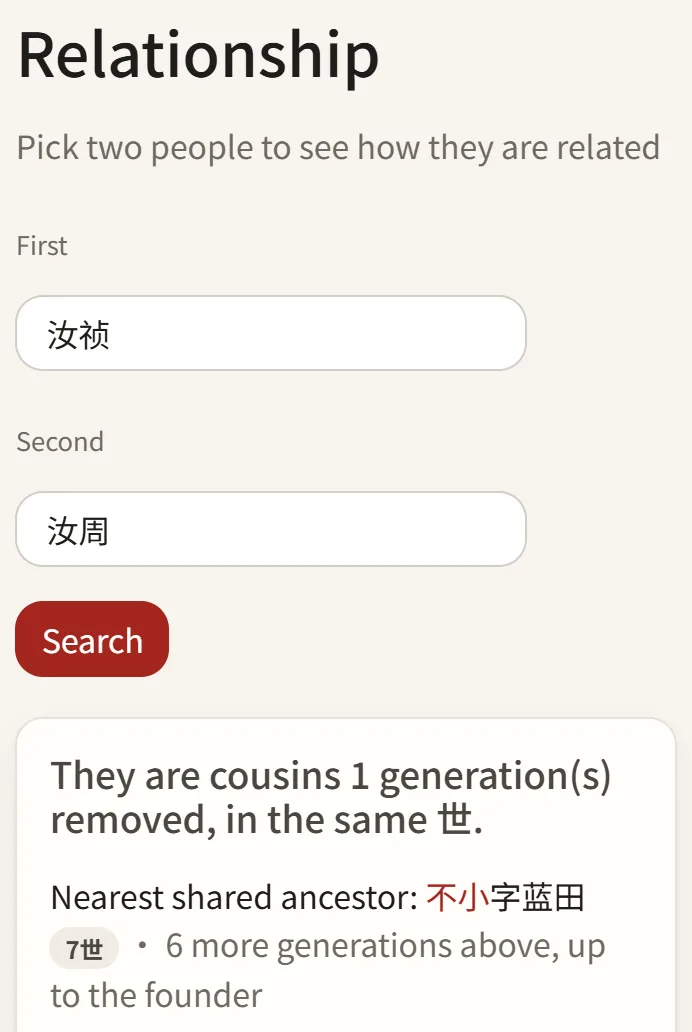
Press Relationship on a person's page (in the chart's ▾ menu it is Find the relationship to someone); First is already filled in with them. Type the other person's name, courtesy name or art name into Second - you can pick from the suggestions - and press Search. Where the name belongs to several people, the page lists them and asks which one you mean.
The answer says how the two are related - brothers or sisters by the same father, cousins of some degree in the same generation, or a descendant so many generations down - and who their nearest shared ancestor is, with the line drawn from the founder down to that ancestor and on to each of them.
Tips
- Seeing ***? That is someone of the recent generations, whose name is kept from the public. Enter the family code (ask the genealogy's administrator for it), or sign in as one of its administrators or as a member linked to it, to see them.
- needs review, beside a name, means the book's writing or lines were unclear at that point when it was read: the record is as close to the book as could be made out, so check it against the page. unverified, beside a father, means the book draws no line to him there; this site worked him out from the layout and notes of the page, and the reasoning is given underneath.
- Errata in the printed book are the book's own misprints, such as a generation character printed wrong. The records keep what was printed; the front page lists what was printed, what it should be, and on which pages.
- Where this line comes from: a genealogy begins with its own first-generation ancestor. Some, such as the Zhao Lineage of Tianchou, also gather the line above him from other genealogies and histories, with their sources, for reference. There is a link to it at the top of Ancestry on a person's page.
- Found a mistake, or someone missing? See adding and correcting people.